Цель заброшена
Автор не отписывался в цели 8 лет 6 месяцев

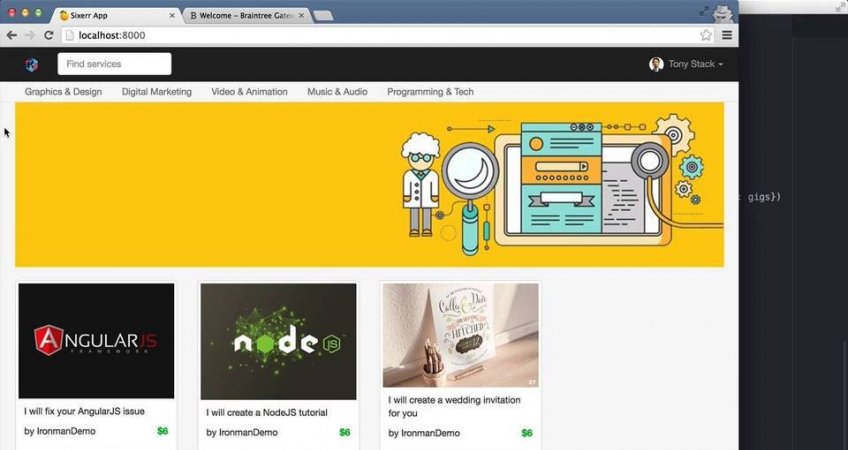
Build Fiverr marketplace with Python Django and Braintree
“I’ve learned Python through an online course, but I don’t know how to use it to make programs”
Yes! This is the common situation of many learners. Usually, the student completes some kind of online programming course but feels lost once the course is over.
You maybe fooled around a bit, learned some basic HTML and CSS, but when it came time to commit, you got cold feet.
I know those things, I got it. Learning to actually code something worth showing off seems time-consuming and scary.
That’s the reason why I’m here to help you overcome it easily!
Code4Startup is going to go with you through the development process.
Code4Startup was sent to earth to teach you how to code and create a two-sided marketplace (a platform that brings buyers and sellers together) in only 6 hours!
As long as you have basic knowledge of HTML, CSS, and programming, you’ll be able to govern in this cool course.
Критерий завершения
готовый проект в моем портфолио
-
Starter
-
What are we building in this project?
-
Tech stacks and tools
-
-
Task 1 - Setting up
As the first task, we're going to install all tools and tech stacks that we will be using in our project. Let's get start!
-
Python
-
Heroku
-
Braintree-PayPal
-
Atom
-
-
Task 2 - Get Started
In this task, we’re going to create our project from empty folder and setup the virtual environment for our Django project. You will learn how to do it easily with step by step.
-
Initialise project
-
Create Home Page
-
Working with layout templates
-
URL name and static resources
-
-
Task 3 - Authenticate with Facebook
In this task, you will be learning how to create authentication with Facebook so users can sign up or sign in with their Facebook account which makes your app more easy to use. Also, you will be learning how to config Python Urls pattern.
-
Create Facebook App
-
Setting up Facebook Auth
-
Refactoring configuration for URL pattern
-
Login/Logout with Facebook
-
-
Task 4 - Refactor Base Template
In this task, we’re going to add Bootstrap into our project and you will be learning how to customise Bootstrap for our Python project.
-
Add Bootstrap
-
Add Navbar
-
Add Footer
-
-
Task 5 - Heroku
In this task, you will be learning how to setup and configure database with static resources for our application so that we can push it on Heroku, a free hosting.
-
Setting up Heroku for Python
-
Configure static resources on Heroku
-
Configure database
-
-
Task 6 - Redesign front end templates
In this task, we’re going to re-design couple of front-end page including the base template, the home page and the gig details page.
-
Update base templates
-
Update Home Page
-
Update Gig Detail Page
-
-
Task 7 - Create Database Models
This task would be interesting as we’re going to create models for database. At the moment, we’re using the default User model from Django with basic info like email, password, etc and everything is fine.
-
Create Profile Model
-
Save avatar from Facebook to database
-
Create Gig Model
-
-
Task 8 - Add Model into Views
In this task, you will be learning how to work with Model and View in Python. In fact, we're going to our database model into our front-end pages.
-
Update base templates
-
Update Home Page
-
Update Gig Detail Page
-
-
Task 9 - Working with dynamic data
In this task, we’re going to create 2 new pages: one page for user to create a gig and one page to display all gigs belong to a single user. We also learn how to create error message for our pages.
-
Create new pages for gig
-
Update Create-Gig page
-
Showing error message
-
Update My-Gig page
-
Refactor Create-Gig page
-
Create Edit-Gig page
-
Update Edit-Gig page
-
-
Task 10 -User Profile
In this task, we’re going to create a profile page to display information about user as well as the list of gigs related to that user. You will be learning how to update or add a new field to an existing model.
-
Create User Profile page
-
Update User Profile page
-
Add Gig list to Profile page
-
Update Profile functions
-
-
Task 11 - Payment with Braintree-PayPal
This task is one of the most favourite section in the whole course as it's dealing with money. We're going to integrate Braintree/Paypal payment system with ease and you're going to love it as you can apply what you learn here to any business...
-
Install Braintree
-
Checkout with Braintree
-
Create database for Purchase
-
-
Task 12 - Summary pages
In this section, we’re going to create 2 summary pages for a user. One to show all gigs that a user bought and the other one listing all gigs that a user sold.
-
Create two summary pages
-
Create functions for summary pages
-
-
Task 13 - Reviews
In this task, we’re going to create functions for a user to review a gig after purchasing that gig. Let’s start by creating new model for Review.
-
Create Review Model
-
Create Review form
-
-
Task 14 - Final touches
So far, our app is working perfectly but we haven’t set links for categories in the home page. In this task, we’re going to do some final touches and then deploy our awesome app to Heroku. Yay!
-
Category links
-
Searching gigs
-
Deploy to Heroku
-
Не пропустите новые записи!
Подпишитесь на цель и следите за ее достижением